JWT with auto-refresh in cookies
Background
JWT tutorials usually stop at "here's an access token, put it in the Authorization header". That gets an API rejecting unauthenticated requests, but a real app also has to deal with:
- Where the token lives in the browser
- What happens when the access token expires
- How the client refreshes without forcing the user to log back in
I built a small demo that covers all three the way you'd do it in production. It's a single Program.cs of about 240 lines.
https://github.com/haiilong/jwt-auth-demo
This isn't a "minimum to demonstrate the concept" sample. The patterns in it (cookie config, the OnMessageReceived hook, the auto-refresh middleware, the order in the pipeline) are the ones I'd use in a real ASP.NET Core API. The few toy parts (in-memory user store, hardcoded signing key, in-memory refresh-token dictionary) are marked as toy and easy to swap, and I list the production replacements near the end.
Two tokens, not one
On login, the demo hands out two tokens:
- Access token, a JWT signed with HS256, very short lived (1 minute in the demo so the refresh is easy to test). It's sent on every request to prove who you are.
- Refresh token, a cryptographically random 32 bytes, longer lived (7 days). It's only used to ask for a new access token.
Splitting them limits the blast radius. If the access token leaks (someone reads your network traffic, an extension scrapes it, the client gets compromised), it's only good for one minute. The refresh token lives much longer, but it only goes back to the server when you refresh, so it's far less exposed.
Production values are usually 5 to 15 minutes for the access token and 7 to 30 days for the refresh token.
Where the tokens live
Two common options:
localStoragein the browser. Your JS code can read it easily, but so can any other script on your origin, which makes it vulnerable to XSS.- HttpOnly cookies. JS can't read them at all; the server sets them and the browser sends them automatically. They're vulnerable to CSRF unless you mitigate it (which is why the cookies in the demo are
SameSite=Strict).
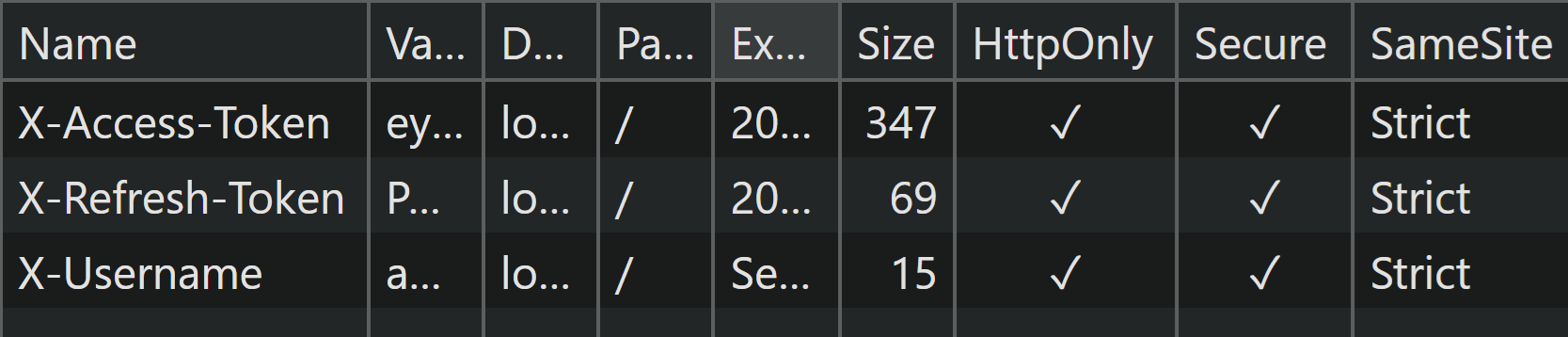
The demo uses option 2. The login endpoint sets three cookies:
http.Response.Cookies.Append("X-Access-Token", accessToken,
    new CookieOptions
    {
        HttpOnly = true,
        Secure = true,
        SameSite = SameSiteMode.Strict,
        Expires = DateTime.UtcNow.AddMinutes(jwtSettings.AccessTokenMinutes)
    });

http.Response.Cookies.Append("X-Refresh-Token", refreshToken,
    new CookieOptions { /* same options, 7 day expiry */ });

http.Response.Cookies.Append("X-Username", user.Username, cookieOpts);
What each flag does:
HttpOnly = true: JS in the browser cannot read or write this cookie, which blocks XSS-based token theft.Secure = true: the cookie is only sent over HTTPS. In production this is non-negotiable.SameSite = SameSiteMode.Strict: the cookie is not sent on cross-site requests at all, which blocks most CSRF attack patterns.
After hitting /login, open the browser's DevTools, Application tab, Cookies, and the localhost entry. The three cookies should be there with HttpOnly and Secure both checked and SameSite=Strict.
Reading the JWT from a cookie
AddJwtBearer looks for the token in the Authorization: Bearer <token> header by default, so it won't find a token in a cookie. To read it from somewhere else, use JwtBearerEvents.OnMessageReceived:
.AddJwtBearer(options =>
{
    options.TokenValidationParameters = new TokenValidationParameters { ... };

    options.Events = new JwtBearerEvents
    {
        OnMessageReceived = context =>
        {
            if (context.Request.Cookies.TryGetValue("X-Access-Token", out var token))
            {
                context.Token = token;
            }
            return Task.CompletedTask;
        }
    };
});
OnMessageReceived runs at the start of authentication on every request. If you set context.Token, the rest of the bearer pipeline (signature validation, claims extraction, lifetime check) uses that value as if it came from the Authorization header. Nothing else in ASP.NET Core's auth setup needs to change.
Use the same hook whenever the JWT lives somewhere other than the standard header: a cookie, a custom header, or a query string for SSE or WebSocket connections.
The naive refresh flow
The demo also has a manual /refresh endpoint:
app.MapPost("/refresh", (HttpContext http) =>
{
    http.Request.Cookies.TryGetValue("X-Refresh-Token", out var cookieRefreshToken);
    http.Request.Cookies.TryGetValue("X-Username", out var cookieUsername);

    if (string.IsNullOrEmpty(cookieRefreshToken) || string.IsNullOrEmpty(cookieUsername))
        return Results.Unauthorized();

    if (!userRefreshTokenDict.TryGetValue(cookieUsername, out var storedRefreshToken)
        || storedRefreshToken != cookieRefreshToken)
        return Results.Forbid();

    // generate new tokens, set new cookies, rotate the server-side refresh-token entry
    // ...
    return Results.Ok(new { message = "Refreshed via Cookies" });
});
With manual refresh, the client does this:
- Client requests
/dashboard. - Server returns 401 because the access token expired.
- Client sees the 401, calls
/refreshto get new tokens. - Client retries
/dashboard.
This works, but every protected request that hits an expired token takes three round trips, and every page open in the browser when the token expires has to do it separately.
Auto-refresh, in middleware
A better option is to refresh on the server, in middleware that runs before authentication. The client only ever sees a successful response.
Here's the middleware:
app.Use(async (context, next) =>
{
    var accessToken = context.Request.Cookies["X-Access-Token"];

    if (IsTokenExpired(accessToken)
        && context.Request.Cookies.TryGetValue("X-Refresh-Token", out var refreshToken)
        && context.Request.Cookies.TryGetValue("X-Username", out var username))
    {
        if (userRefreshTokenDict.TryGetValue(username!, out var storedRefreshToken)
            && storedRefreshToken == refreshToken)
        {
            var user = users.FirstOrDefault(u => u.Username == username);
            if (user != null)
            {
                // 1. Generate new tokens
                var newAccessToken = GenerateAccessToken(...);
                var newRefreshToken = GenerateRefreshToken();

                // 2. Update the server-side refresh-token store
                userRefreshTokenDict[username!] = newRefreshToken;

                // 3. Write the new tokens to the response as fresh cookies
                context.Response.Cookies.Append("X-Access-Token", newAccessToken, ...);
                context.Response.Cookies.Append("X-Refresh-Token", newRefreshToken, ...);

                // 4. IMPORTANT: inject the new token into the CURRENT REQUEST's headers
                // so UseAuthentication sees a valid token and lets this request through
                context.Request.Headers.Append("Authorization", "Bearer " + newAccessToken);
            }
        }
    }

    await next();
});

app.UseAuthentication();
app.UseAuthorization();
It does four things:
- Check if a refresh is needed. Look at the access token cookie. If it's missing or expired, and there's a refresh token cookie and a username cookie, proceed.
- Validate the refresh token against the server-side store. The server, not the client, decides whether the refresh token is valid. If the client's refresh token doesn't match what we have on file, the middleware does nothing and
UseAuthenticationrejects the request as usual. - Issue new tokens and write them as cookies on the response. The browser stores them and sends them on the next request, so the user stays logged in without clicking anything.
- Inject the new access token into the current request's
Authorizationheader. Without this, the middleware would refresh the token for future requests, but the current request would still reachUseAuthenticationwith the expired (or missing) cookie token and get a 401. Putting the new token whereUseAuthenticationlooks for it lets the request that triggered the refresh succeed too.
Order of operations
The middleware order is:
app.Use(/* auto-refresh */);
app.UseAuthentication();
app.UseAuthorization();
The auto-refresh middleware has to run BEFORE UseAuthentication, because:
UseAuthenticationis what reads the JWT, validates the signature, and builds theClaimsPrincipal.- If
UseAuthenticationruns first with an expired token, it rejects the request before anything can refresh it. - The auto-refresh middleware has to rewrite the request before
UseAuthenticationreads it.
If you put the refresh middleware after UseAuthentication, every protected request with an expired token returns 401, which puts you back on the manual flow.
This is also why step 4 exists. Setting the cookie on the response doesn't help the current request, because authentication reads cookies from the request, and that request still carries the old cookie. Injecting the new token into the request headers is what gets the current request through.
Walking through it
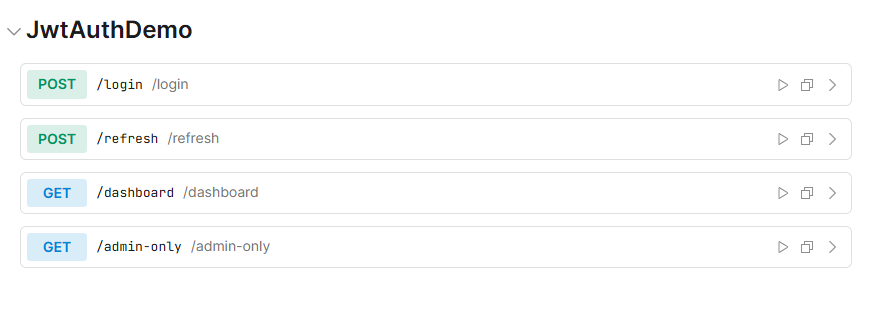
Run the demo with dotnet run, then navigate to the URL the console shows (something like http://localhost:5265/scalar). The Scalar UI lists all four endpoints. /login and /refresh are public. /dashboard requires any authenticated user, and /admin-only requires the Admin role on top of that.
To see the refresh in action:
- Hit
/loginwith{"username":"admin","password":"password"}. The cookies get set and the response body is{"message":"Logged in via Cookies"}. - Hit
/dashboard. It returnsHello User!using the same cookies. - Wait one minute. The access token is now expired.
- Hit
/dashboardagain. It still returnsHello User!, with no 401 and no client-side retry. The middleware saw the expired access token, validated the refresh token, issued new tokens, set fresh cookies on the response, injected the new token into the request, and let it through. From the client's side, the request just worked.
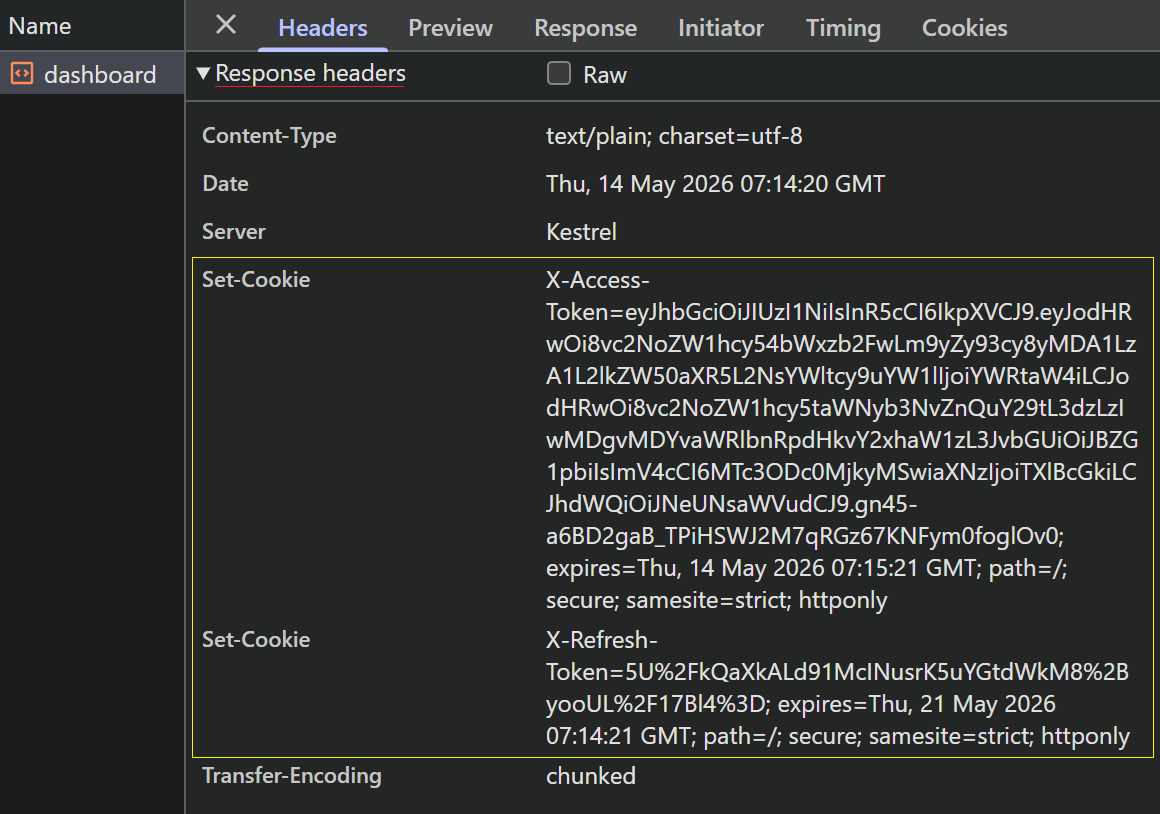
To watch it happen, open the DevTools Network tab before that last /dashboard call. Click the request afterwards and check the Response Headers panel. There should be two fresh Set-Cookie lines (X-Access-Token=... and X-Refresh-Token=...) on a 200 OK response for /dashboard, which means the server issued new credentials during what looked like a normal call.
What happens on failure
The failure cases, and how the demo handles them:
- No access token cookie at all.
IsTokenExpired(null)returnstrue. If there's no refresh token cookie either, the middleware does nothing, andUseAuthenticationreturns 401. - Access token expired, refresh token missing. Middleware does nothing, request falls through to 401. The user logs in again.
- Access token expired, refresh token present but doesn't match the server's record. Lookup fails, middleware does nothing, request gets 401. This protects against a stolen refresh token. If the server's record doesn't match (because the user logged out, or the refresh was rotated by another request), the stolen token is useless.
- Refresh token matches but the user no longer exists.
users.FirstOrDefault(...)returns null, middleware does nothing, request gets 401.
In all four cases, if anything fails, the request falls through to UseAuthentication and gets rejected the normal way. The middleware never throws; it either rewrites the request or does nothing and lets the auth layer say no.
What you'd add for production
The middleware, cookie configuration, OnMessageReceived hook, and auto-refresh flow can go to production as they are. What needs to change is mostly the data plumbing:
- Refresh tokens in
Dictionary<string, string>. Replace with a database table (or Redis), keyed by user ID. Store the hash of the refresh token, not the token itself; compare hashes on validation. Once you scale horizontally, the store has to be shared, so process-local memory won't work. - Refresh token rotation with reuse detection. The demo rotates on every refresh (
userRefreshTokenDict[username!] = newRefreshToken;), which is correct. Production should also detect the "reuse of an already-rotated refresh token" case and revoke everything for that user; reuse means either a bug or a stolen token, and either way you want to invalidate. - Token versioning for revocation. Add a
tokenVersionclaim to the JWT, compare against a value in the user table on every refresh. This lets you force-invalidate all active tokens (logout-from-all-devices, password change, suspected compromise). - Hardcoded signing key. Move to configuration, ideally a managed secret store, rotated on a schedule. For higher-security setups, switch from HS256 (shared secret) to RS256 (public/private keypair) so verifiers don't need the signing key.
- In-memory users with plaintext passwords. Use the real user table, and hash passwords with BCrypt or Argon2id, never plaintext or plain SHA-256.
- CSRF beyond
SameSite=Strict. Strict gets you most of the way. If you ever have to relax toLax(cross-subdomain navigation, OAuth callbacks), add an anti-forgery token on state-changing endpoints. - HTTPS only. Already enforced by
Secure=trueon the cookies, but the host itself should refuse HTTP entirely in production.
Closing
Clone the repo, run it, watch the cookies rotate in DevTools, and you'll have most of what you need to build this into a real codebase.